A Second Public IP on UniFi Without the Pain #
If your ISP hands you an extra public IP as a framed route which is a single /32 routed to your existing WAN address rather than delivered on the WAN segment, the internet will tell you that you need to do something elaborate to use it on UniFi gear. Turns out you don’t: my UniFi gateway handled it natively.
What “framed route” actually means #
The extra IP arrives via the RADIUS Framed-Route attribute. In plain terms: the ISP just routes that /32 to you, with your current WAN IP as the next hop. The packets for your framed IP address simply turn up at your existing WAN interface. The address is not a second IP you configure on the WAN port, and it isn’t on the WAN’s local subnet.
This matters because most guides assume you can assign the static IP onto your WAN interface. With a framed /32 you can’t and for ISPs that only allow you to connect via DHCP (common on the NBN here in AU) even when your IP address is a ‘static’ one, its really a fixed DHCP allocation, so you can’t mix a static WAN IP alongside the DHCP one anyway on the interface configuration.
The workarounds you can skip #
Researching this turns up various suggested solutions:
- Run a PPPoE server on a separate EdgeRouter and put UniFi behind it.
- 1:1 NAT which technically double-NATs your traffic.
- Assign the IP to a VLAN interface which a
/32can’t do anyway, since there’s no spare address to burn on the interface itself setting up the routes. - CLI /
config.gateway.jsonhacks. I have tried this before, and they break constantly then one day might just disappear from your device config.
None of these are necessary if your UniFi Network version exposes Source and Destination NAT in the GUI.
The simple solution: SNAT + DNAT #
The /32 never touches an interface. It only ever lives inside two NAT rules.
Inbound — Destination NAT. Match traffic arriving on WAN destined for the /32 and
rewrite the destination to your internal host (all ports, or per-port if you’re sharing the address across services). This is how you publish a service on the second IP.
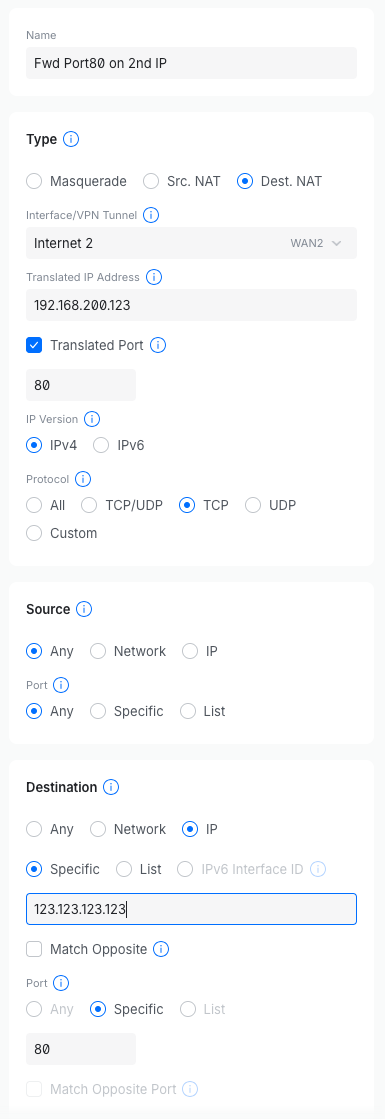
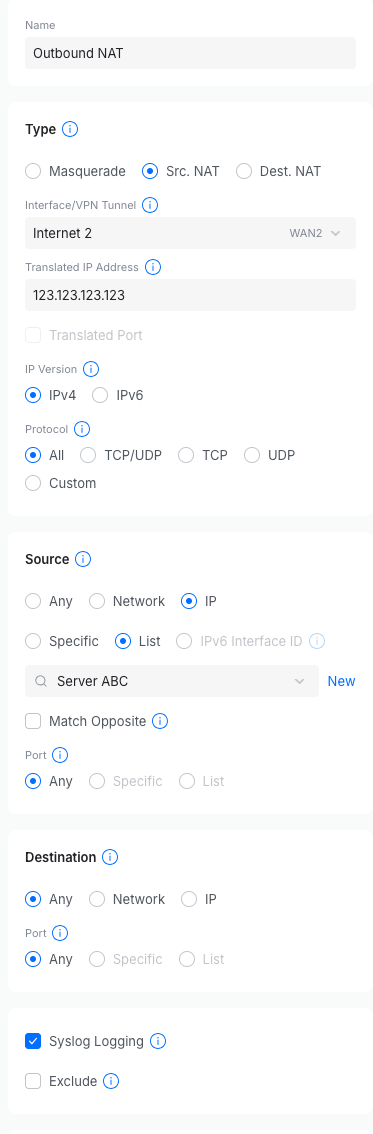
Outbound — Source NAT. Match traffic from your chosen internal host (or subnet) and rewrite the source to the /32, exiting via WAN. This makes that host egress as the second public IP instead of the primary — outbound overload / PAT, the way you’d expect.
That’s the whole configuration. No interface assignment, no PPPoE, no double-NAT, no CLI.
Two things to keep in mind #
Nothing ARPs for the /32. Because the ISP routes it to your WAN IP as next hop there’s no “claim the address” step. If inbound traffic arrives and your DNAT rule matches, it works. If it doesn’t, suspect the upstream framed route (is it active? is the next hop your current WAN address?) before your own rules.
My ISP originally had some trouble with the concept, so I had to do some packet traces to show that the destination traffic for the new IP wasn’t getting to my interface to start with from an outside host, but traffic for my existing IP address was.
I also did remote traceroute tests to the existing and new framed IP addresses, and could show that their routes were different in the last few hops, which indicated a config issue at their end. Once I did this, they went and found the problem and sorted it out pretty quickly.
Watch the outbound return path. Make sure your chosen host actually leaves via the SNAT rule and isn’t using the default outbound NAT masquerade. Rule order and specificity matter here otherwise you can end up with traffic sourcing from places you don’t want it to. I use My External IP for this, mostly because the “raw” option just returns your IP address, which is super useful in scripts and automated tests.
Summary #
A framed /32 plus the GUI-based SNAT/DNAT on your UniFi router is all you need. If you are researching this like I did, you will find solutions for PPPoE servers, secondary routers, and config-file hacks that are actually un-necessary, so hopefully this helps someone save the time it took me to figure this out.